Wednesday, November 5, 2014

Ars Technica, this is NOT news, nothing to do with Windows today

NOT news at all. Besides, this is a Windows XP screenshot!
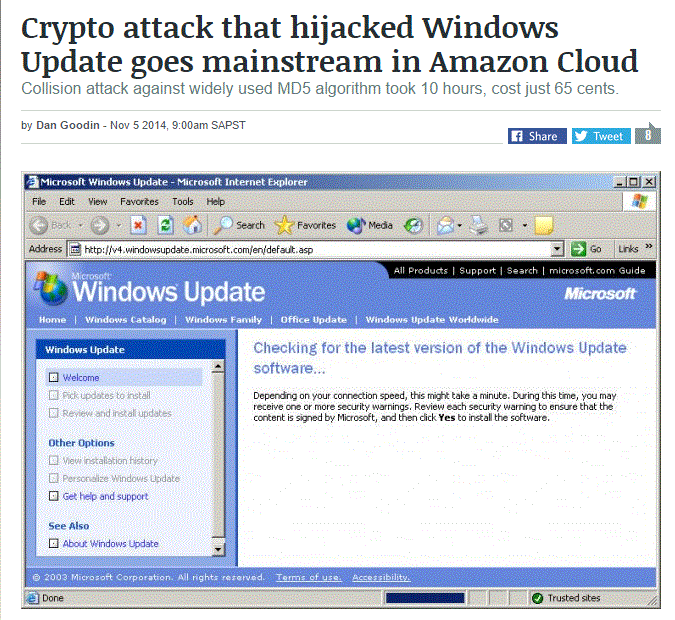
Ars Technica, caterer to the "alpha geeks" technologists and IT professionals, published today this article which may be misleading specially for some unsuspecting Windows users who don't know better. First of all, the whole article is mostly dedicated to explain "how broken the widely used MD5 hashing algorithm is" that is, the cryptographic mechanism to provide some assurance that a transferred file (read, downloaded software, update, etc.) has arrived intact. Secondly, this is old news under the guise of breaking news (?); something that happened in 2012 and 2007, according to the article. Just read about this subject in a Wikipedia article citing that "in 2012, according to Microsoft, the authors of the Flame malware used an MD5 collision to forge a Windows code-signing certificate" and the issue goes back to 1996 (!). And how is this "news" related to Amazon Cloud, again? Last, BUT NOT LEAST, the flashy screenshot corresponds to the phased out Windows XP (!). Obviously you can always find flaws in old software, but that is not news!

Wednesday, September 10, 2014

Posterpedia: the big picture of MS technologies

Posterpedia
Posterpedia is an interactive app (for Windows 8 and Windows Phone 8) that uses technical posters as a reference for understanding Microsoft technologies. This graphical, easy to understand format, links directly to Microsoft TechNet and Microsoft MSDN content. Remember those huge and neat paper posters that started circulating about a decade ago with Visual Studio and .NET technologies? Well, this is the same proposition in a digital and more manageable format. Visit http://www.serverposterpedia.com/, though you could also get them individually in PDF format. This wonderful and useful collection of posters is broken down by Microsoft products: Windows Server (11 posters), SQL Server (3), Business Intelligence (1), Solutions (15), Exchange Server (5), Lync Server (2), System Center (1), Microsoft Azure (10), Office (2), SharePoint Server (23), etc.

Sunday, January 12, 2014

Windows 8 myths — 3. There is a lack of apps

Compared to iPad (the tablet) and the different Android tablets there is no doubt a bigger number of apps available than in the Windows app store. However, we should make the distinction that even if you are running a Windows tablet like the beautiful and extremely functional Surface, in addition to the "metro" apps (the ones running in "tile mode") you can still run millions and millions of the traditional Windows software applications that run in Windows 7 and even in the venerable Windows XP. In sum, you have a number of choices when it comes to Windows 8 apps: desktop apps, like Microsoft Office, new apps for the new Windows 8.x, custom merchandizing apps, and all the Windows store apps.

Windows 8 myths — 2. Computers sales are down because people didn't like Windows 8. Really?!

Computers sales are down for the last couple of years, most notably in 2013, simply because most people (consumers) can do without a PC or any type of computer by just using smartphones or tablets. They have e-mail, text messaging, video, Internet browsing, games (lots of them!) and on top of that the ability to make phone calls, so who needs a laptop computer and much less a desktop computer to do those things? In addition, for a vast number of people around the world a smartphone it is most likely their first experience with a computer and that's all they know and all they need. Computers sales for corporations and businesses will fare slightly better in 2014. Post-PC era? Desktop PCs and laptop computers will continue to be in business for years to come. They're already a commodity.

Windows 8 myths — 1. It's confusing and it has a learning curve

This myth is easily debunked by evidence based on usage. You just have to use it to understand it, and getting the knack of it will take only a few minutes. Remember to also use the Windows key (the one to the left of the ALT key, to the left of the Space key). There is nothing confusing about it unless you cannot wrap your head around the fact that the tiles ("The Star Menu") are simply an extra layer of what otherwise is simply Windows 7. You have the traditional desktop on the one hand and you have the tiles on the other hand, and you can even start Windows directly in "desktop mode" if so you wish. Other than that, whatever you can run in Windows 7 will run in Windows 8.x.  Other visible difference is that Windows 8.x does not include the fancy transparent borders of Windows 7 (or Vista) called "aero effect." Are you missing the traditional "Start Menu"? If you are very fond of it it's probably because you never learned to use shortcuts on the desktop or the convenience of adding shortcuts right onto the Taskbar. Do you still miss it? Try some Windows Start Menu alternatives (I'm not endorsing any of them, though). In addition, whenever you are in the Tiles mode, simply start typing whatever you are looking for and the search box will pop up instantly for you. Please, stop complaining and just type... You can also try these very useful educational videos to get started.

Thursday, October 24, 2013

Windows 8.1 may be in your near future

Beyond Windows 7 is Windows 8.1, the latest iteration in the form of a meaningful upgrade of the Windows operating system. You can do everything you are used to do (if it runs in Win 7, it'll certainly run in Win 8.1). In addition to the traditional desktop and the ability to work with all types of software you get a new taskbar, ready for touch devices, access to thousands of apps from the Windows Store, Start screen with live updates and personal settings that appear on up to five different PCs. When it comes to search you can have a single search to find things across the web, apps, and your PC; all you need to do is start typing while on the Tiles mode. See for yourself what's in store for Windows 7 users. I also understand you may not be ready to upgrade and probably don't need to. I personally always liked Windows 7, its nimbleness and the beauty of the aero effect, not to mention the amazing technology under the hood. I use and like equally both.

Sunday, June 23, 2013

Internet Explorer 10 is for Windows 7 too

And a good upgrade. If you have not upgraded from IE 9 or previous versions you are missing not only on features but on improved security as it is always the case when a new Internet Explorer version arrives. Though this new version is hardly the latest news, I decided to post about IE 10 for Windows 7 only after having used it for several months now. It's a worthy upgrade for a browser that is more standards-compliant than ever. Try some showcase videos here.

End of retail customer service as the weakest link for Microsoft products?

Not an unusual view in some Best Buy stores: empty displays or
misplaced merchandise, not to mention frozen PCs. This is my experience.
Microsoft has finally decided to be on top of things to guarantee that its latest PCs with Windows 8 get to more customers, taking a page from the Apple stores. Needless to say Apple sells more and more computers and software thanks to a well greased retail system where the customer service reps actually know what they are talking about, let alone the quality of their products. Contrast that with the poor experience you get when visiting a retail store like Best Buy or a similar chain. First of all, the reps kind of elude you and if you finally get their attention they may talk down to you and try to get rid of you as soon as possible. Or even worse, they don't understand your questions if you happen to be a more educated consumer. The other day I asked one of these young fellows "What is the computer with the best quality, the best materials?", I said that referring to some flimsy plastic HP laptops and looking for something better. Though I had to rephrase my question, the fellow replied "I don't understand your question" (!) with an unequivocal expression of annoyance. I don't think this is just my personal experience. Let's hope that, now that Microsoft and Best Buy are teaming up to open 500 Windows Store locations inside this big retailer stores, things get better. On the other hand, I hope that Microsoft Retail Stores improve as well. I remember very well when I visited the one in Times Square, New York (is it still there?) to find a very nice place with nice reps but not too well versed in Windows 8. I was showing to some of them how to use Windows 8... (!) Retail will continue to be the weakest link for Microsoft as long as they continue to hire at lower wages people who are not exactly experts in their wares (unlike the Apple guys). Why don't you hire people who really know IT and who appreciate Microsoft products? The caveat is: you will have to pay them higher wages... That's small potatoes for the deep pockets of Microsoft, so why not?

Tuesday, July 31, 2012

Why chkdsk in a Windows 7 and Windows 8 dual boot?!

In a PC with two main operating systems like Windows 8 and Windows 7, each one in a separate disk partition, there appears to be a problem when switching to Windows 7 (after having previously loaded Windows 8 and restarted the computer). This is a really annoying situation in which, just when you thought you were ready to start Windows 7, the basic black screen pops up with the message: "One of your disks need to be checked for consistency. You may cancel the disk check, but itis strongly recommended that you continue." Of course you can cancel the timed operation but it will show up the next time... and you are never really sure if there is an actual problem with your disk and/or each one of its partitions. I have not yet found the solution myself, but there are some options may be worth trying. The first one is to use the Bootrec.exe tool in the Windows Recovery Environment to troubleshoot and repair startup issues in Windows. Other options I will have to first find and then test, but I read somewhere that a Windows 8 not correctly shut down may affect starting other operating systems, like Windows 7. I'll post the solution when I find it.

It's not the economy, it's lousy customer service, stupid

You'd probably have thought about this more than once. Whenever you go to a "information age" store (the big IT supermakets, or any wireless phone service provider) or even call a 1-800 service, have you not left, or hung up, with a sensation that you deserved better attention and better information? Don't you find frustrating when you have a question or need something and there is nobody around to help you? And how about, when you finally get hold of someone and this person, who almost invariably never smiles, is either "cold" in a a rude sort of way or plain clueless, or both? I've experienced this more than once and throughout the years, and I do not believe, for  a moment, that it's because I live in a self-centered and in-your-face city like New York. I know this is a national phenomenon. Let's face it. Customer service in the U.S. sucks. I have one simple explanation, rooted in corporate greed: cheap labor. It's not, mainly, the economy. Cheap labor entails hiring low skilled people, paying them minimum wage (or less!), a work force ill-prepared to help people, with an attitude that says loud and clear "I don't care", and who most of the time are young people, who are longing to punch out the clock the minute they start their work shift. I don't blame them, they are nickled and dimed every day. Remember CompUSA? I witnessed their demise and how it was rare to find genuine help. The same fate befell Circuit City and it will continue to be like that for other giants. I believe, for example, that Apple stores have been successful also because their employees are focused and willing to help, in spite of low salaries... The root of this bad customer service situation, more a consequence than a cause, is corporate greed, where big selfish, self aggrandized honchos, refuse to share their wealth. What's a few million dollars to hire, train and retain, sterling customer service in the big scheme of things of a company that have even billions in profit? They're shooting themselves in the foot... Provide good customer service and expect repeat business. This simple truth apparently escapes many a CEO who thinks the bottom line is only about sophisticated "business models" and Excel charts and business jargon and Wall Street... Only in America?

Outlook.com: a modern email for the next billion mailboxes

Microsoft launched today its new web mail service, Outlook.com, as a personal e-mail service that aspires to be "a modern email for the next billion mailboxes." It is the same desktop application and service for business (Exchange server) that you are probably already used to, but with a new Metro interface, from within your Internet browser, with a neat interface and a nimble performance . You can subscribe to this free service either creating a new account or using one of your Hotmail or Live.com accounts. Outlook.com will replace Hotmail and its aimed, among other things, to attract users from Google's Gmail service as a very solid competitor. Microsoft thinks that the time is right to reimagine email, "we realized that we needed to take a bold step, break from the past and build you a brand new service from the ground up." Read more in the Outlook Blog.

Wednesday, June 20, 2012

Surface: a tablet to level the field

Yesterday, in LA, Microsoft launched new devices to go with the upcoming iteration of the Windows 8 operating system frenzy in the form of a new tablet, called Surface, and with Microsoft hardware. It happened during a secretive gathering of selected media representatives who never knew exactly what they were going to cover up until the last minute. There are two products that were introduced: Surface for Windows RT and the Surface for Windows 8 Pro with an Intel microprocessor, full HD display, both having specs that rival the finest ultrabooks. The live coverage was really poor and did not do justice to what was introduced, not because of lack of information, but I would say because of the preconceived notions about Microsoft products coming from die-hard Apple and Linux (Android) followers, some of them among the press corps. I was able to see the entire launch show late last night (length: 47 minutes) thanks to my Nokia Lumia and the super useful and fun app called I am a WP7, though I could not find it today. I was really astonished by the coolness of the product and the perfect coreography that started with a Steve Ballmer more focused than ever, almost as a real guru, followed by the rest of the team, including a trip down memory lane through 30 years of Microsoft hardware innovation and some actual pictures of the Surface being designed and built in a sophisticated environment. What the media saw in LA was not reflected in what I have read so far on the Web. When the show started with Ballmer, practically nobody gave him a welcome, but as the show rolled down, you could hear the audience more enthusiastic, cheering. No doubt. Surface is a compelling and impressive product.

Saturday, June 9, 2012

Easybits, get off my computer now!

I have discovered on my desktop a shortcut icon to something called GameXN, a program which was installed unbeknownst to me. After some research I found out that this is the "game go organizer" or whatever that is called, a software product coming from Easybits (there is no link here, therefore no free publicity),  a Norwegian Company based in Oslo, developing the "Skype game channel". What in the world?! Who asked for games? This might have happened while I opened Skype the last time. Can we trust any messages or prompts that pop up in familiar applications any longer. No wonder Skype users are or were riled. My installation took place only a week ago. Look and see if you have a folder called C:\ProgramData\GameXN, then uninstall it, if you did not request that installation.

Monday, June 4, 2012

Mistery error 1310 when performing software installations

webConnect Managed unresolved error
Apparently, many a vendor just test their software applications only in the Windows XP and below operating systems, leaving the Windows 7 users under the "buyer beware" policy and in the process they stick the product with the "Windows 7 compatible" label, regardless. Case in point, the T-Mobile webConnect Manager software installation. This particular installation process decides that in addition to unzipping the necessary files to a temp directory (C:\Users\UserName\AppData\Local\Temp, which is normal, though not necessarily into the Administrator folders) it also unzips them into the path shown in the attached picture above. After much tweaking, I was able to solve this problem but only after performing the installation logged in as Administrator, since the simple "run as" won't work, and the .inf file shown in the path above does not even exist. Only logged in as Administrator, and having started the installation process, you will be able to see that directory and that particularly file, BUT you still need to modify the access rights by giving all access to "Everyone" not just the Administrators group. Once I did that the installation continued and it was successful, both in Windows 7 and in the newest Windows 8 Release Preview. However, the whole process went not as smooth as it appears to be. Previously, I had to call T-Mobile tech support only to hear that they (three differents customer reps) don't know about "Error 1310" (but are they supposed to know about it?) and that this error was a problem with my computer, and (perhaps understandably so?)  they also did not even care to hear what the message read. The only "solution" they offered was that I have to get a wi-fi connection in order to set up my Internet connection with my broadband modem and that only under those circumstances it will work. It wouldn't. However, the actual problem ("error 1310") was "access rights" within a folder the installer has no business dealing with, in the first place. Who should we blame? Software vendors for substandard software? Tech support for not offering at least some hints? This situation of not well documented, at least consistently, error messages is what goes against a brand name and contributes to popular perceptions or misconceptions of a product (whether software application and/or operating system).

Thursday, April 12, 2012

Another way to quickly access essential information about your PC

There are several ways to get information about your computer system. One of them is the "computer management" tool (right click on "My Computer" icon and choose "Manage") using an Administrator account. However, if all you need is to quickly access part of that information, like hardware components, open Devices and Printers (press the Windows Key and start typing "Devices and..." to get there) then localize your computer and right click to see the menu shown here. The menu choices are self-explanatory and from there you can control major PC settings but if you want to get a closer look at the hardware settings and drivers, select "Properties" and then the hardware tab. In general, the Devices and Printers utility can show you a bird's eye view of your entire computer ecosystem.

Thursday, April 5, 2012

TurboTax 2011: Windows XP Mode to the rescue but problem persists under Windows 7

I had to resort to Windows XP Mode to be able to run TurboTax 2011 after one last attempt (one of many) to reinstall the program. Apparently, disabling the antivirus program, and modifying the Firewall inbound and outbound rules before installing did not help this time either. Same old story: I get a terse "TurboTax 2011 Is Installed" message with a "Done" button to click on. Then, the same frustration (see previous post) and the program does not start and does not even say whatever is wrong. Will I, or any of my readers, ever know what happened?On the other hand, Windows XP mode, which I like a lot, is not intended to run "new" software. "New" software should run well under Windows 7. No excuses. On the other hand, it is clear that Intuit, the company behind TurboTax, is aware of this problem, as indicated in their user forum hereand also here, where other folks have complained too. It seems that this "old" problem apparently has not been taken care of. That is just unacceptable!

Wednesday, April 4, 2012

Waiting for TurboTax to get things ready... in time for tax season?

This year the TurboTax 2011 software has a serious problem which is basically that it does not start (!) All it does is showing the screen we see here and then, a few seconds later, it is gone with no message, no warning. Nothing. I have installed and reinstalled this software (I'm running Windows 7 Ultimate 64-bit) to no avail. Trust me, I have followed all the suggestions found in http://turbotax.intuit.com/support/, which, by the way, are mostly related to Windows XP, no matter what they say. I have even tried the "Repair" option (in the uninstall program), waited patiently to finish and see some sort of "successfully repaired" message. But that is not true. Finally, I applied the manual update, to no avail, in spite of the message shown below, a false positive, and not true either. This is the first year I get to have such a frustrating experience with one of my favorite software applications... Is this related to the version of the .NET Framework you are running, or to Java? Go figure! Intuit, please get ready asap! [FYI, I tried this, and this]

Wednesday, March 14, 2012

I can't ever stress this enough: Install Windows XP Mode

Windows XP Mode running under Windows 7. Click and learn how.
I want to come back to the subject of Windows XP Mode. This is an application you can download and install, for free, if you are running Windows 7. It serves basically one main purpose: to run your Windows XP and legacy applications, within Windows 7 simply as another Windows application. Another key use is to keep old versions of software which, it just happens, when installed in Windows 7, may mess up your nice set up, for instance: Office 2003 and Acrobat 8, to name only a few. Last, but not least, you can continue using your company's old custom applications without a problem. The video, a 29'08" complete course on Windows XP Mode, provides an in depth look at the features and capabilities, as well as guidance for IT pros, of this must-have tool for Windows 7. Windows XP mode works seamlessly within Windows 7 where you can run all desired applications under one virtual machine (one window) or individually in its own window.

Wednesday, February 29, 2012

Windows 8's newest competition: Windows 7

With the release today of the Windows 8 Consumer Preview (read "beta version"), and a final release scheduled for late 2012, the stage is now set for Windows 7 to become a competitor of Windows 8. While, on the other hand, millions of users will continue to use Windows XP arguably till their old computers give out, it is most likely they will have two choices when buying a new PC: either Windows 7 or Windows 8. However, if the goal is to get a tablet PC, then Windows 8 is the operating system to choose, if neither an iPad or an Android system will do for them.

Thursday, February 23, 2012

Year of the Dragon as your Windows 7 theme

According to the Chinese (and Mongolian) zodiac this is the Year of the Dragon, and to top it off a leap year. So what luckiest could it get? I, for one, declare my inclination to believe in signs, stars, "angels" and the Universe. If you want to wear this sort of amulet in your PC you can download the Year of the Dragon theme, in the Windows 7 themes page. Good Luck. Buona Fortuna. Bonne Chance. Buena Suerte.